 CapMemo
日本語
How to Save and Organize Kids’ Artwork
Start with one small pile. Pick a few drawings, photograph them in soft daylight, and add a date or a short note while you still remember it. Keep the originals you’d miss holding in your hands. The rest can take up less space.
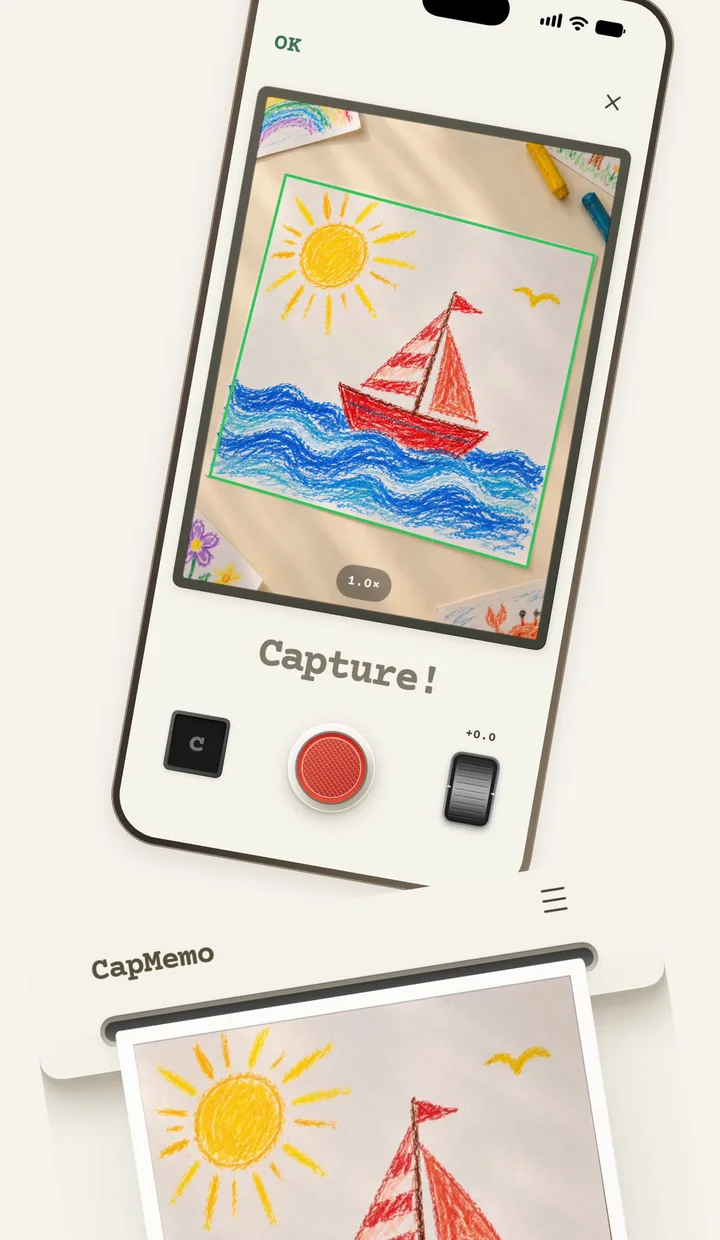
1. Pick a few drawings to start
Try ten rather than the whole school year. Include the drawings that tell a story: the first self-portrait, a picture of the family, or the dinosaur your child drew again and again. If there’s a name or a date on the back, photograph that separately or copy it into a note.
2. Photograph an A4 drawing without skewing it
Lay the sheet flat on a matte surface that contrasts with the paper. A dark table or plain dark fabric works well under white paper. Move the sheet close to a window with soft light, then stand where your body and phone won’t cast a shadow across it.
- Hold the iPhone directly above the center of the sheet, with the phone and paper parallel. Leave a little space around all four corners. For a long drawing, turn the phone so the whole sheet fits.
- Use the camera grid to check that the top and bottom edges run in the same direction. If one end looks wider than the other, level the phone and move it back over the center.
- Take the photo and open it to check the corners and any small writing. If CapMemo cropped too close, adjust the crop or retake the photo. A straight shot also makes fine lines easier to read.
3. Match the light to the material
Crayon and colored pencil. Use soft light from a nearby window. A little light from the side can show the texture of wax or paper, while a bright spot can hide pale marks. Check a light-colored part of the drawing before you put it away.
Watercolor. Let the sheet dry first. Use indirect daylight and move the paper if you see glare. A neutral surface around the drawing makes it easier to judge whether the whites and light washes look right.
Paper crafts and clay. Use a plain background and take one photo at an angle that shows the shape. Add a closer photo if there’s a detail you want to remember. A wide view with the whole object in the frame usually tells more of the story than a tight crop.
4. Keep enough context to find it again
Start with a date, age, or one phrase your child said about the drawing. A note like “red boat, first day of summer” is easier to recognize later than a file called IMG_4729. In CapMemo, you can photograph a drawing, check the crop, add a frame, and look it up by a clue such as “red boat.” Search works on your iPhone, even offline.
5. Decide which originals to keep
Set aside pieces you’d miss holding, such as the first recognizable self-portrait, a handwritten note on the back, or a collage with pieces that lift off the page. Let your child choose a few favorites. A folder labeled with the school year keeps those originals easy to find.
For the rest, open the digital copy and check the edges, colors, and any writing on the back before making a decision. Make a separate backup of the images you would hate to lose, and check that you can open it. If you’re still unsure about a piece, keep it in a small “decide later” pile and come back to it together.